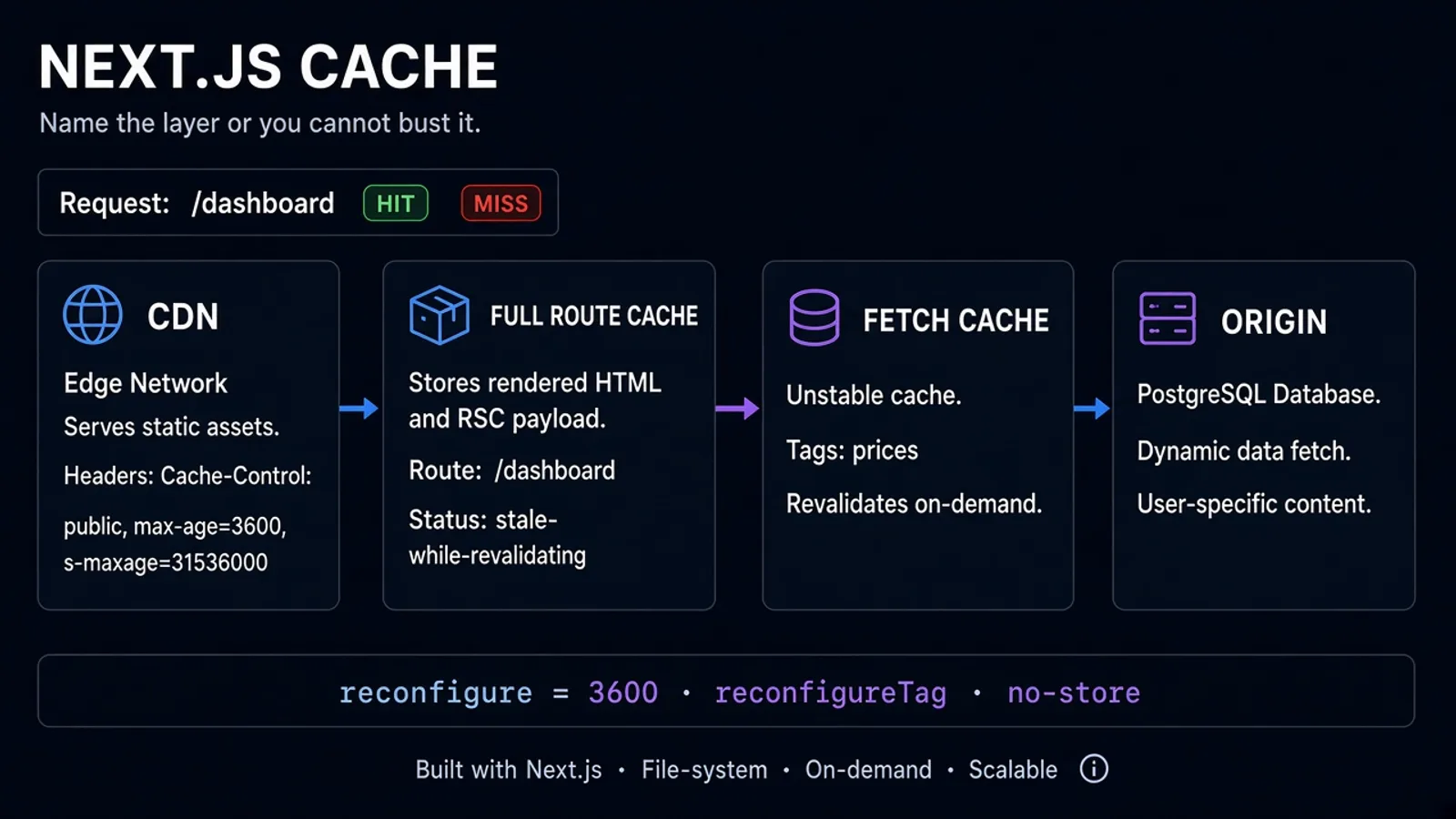
Next.js App Router caching is powerful and easy to get wrong. A page that "should be live" stays stale. A page that should be static hits the origin on every request. The docs name several caches; production only cares about what the user got and whether your server ran.
This is the mental model we use on product engineering work in the App Router. It pairs with Next.js Server Components (what renders where) and React Server Actions (mutations). Caching is the third axis: when work is reused.
Myrafy.com itself uses revalidate on Insights so queued posts appear when their date arrives without a full rebuild. That is the feature. It is also how a product accidentally serves yesterday's price.
The Layers (In the Order Traffic Hits Them)
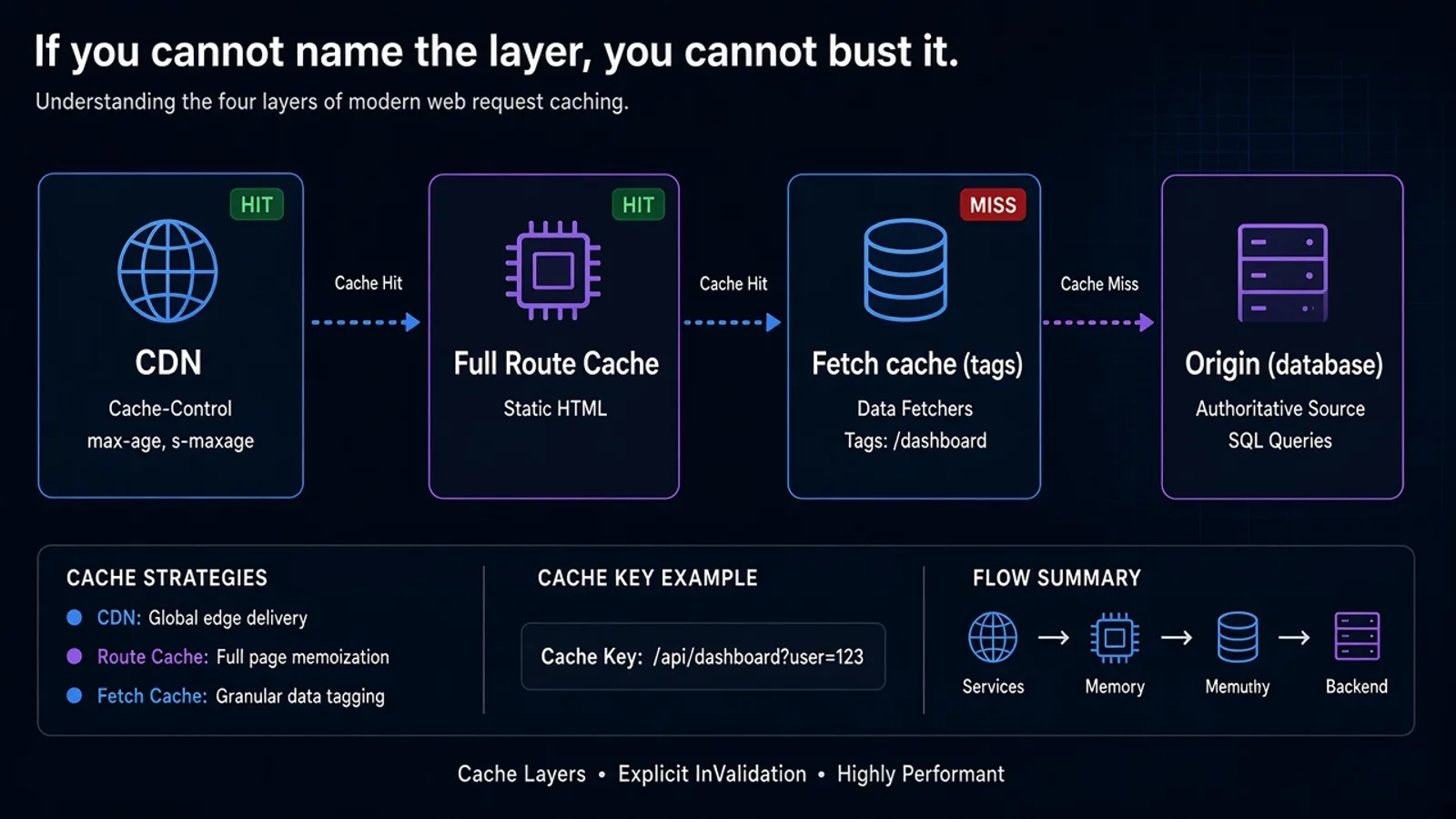
Think in four places, not one "Next cache":
- CDN / platform cache (Vercel, Cloudflare, your nginx). HTTP
Cache-Controlwins arguments. - Full Route Cache - the finished RSC payload for a route, when Next decides the page is static enough to store.
- Data cache -
fetch(and some other data APIs) stored across requests, keyed by URL + options. - Origin - database, CMS,
fsreads, third-party APIs. This is the only layer that knows the truth.
revalidate = 3600 on a route means "this stored route is willing to be at most about an hour old" if the rest of the tree did not opt into dynamic rendering. It is not a cron that rebuilds the world.
If any segment calls cookies(), headers(), or an uncached fetch, you have left the static path. That is correct for a dashboard. It is a surprise for a marketing article.
`fetch` Defaults Will Bite You
In the App Router, fetch is not "just node fetch." Unless you say otherwise, GET requests can be stored.
Be explicit:
- Static content:
fetch(url, { next: { revalidate: 3600, tags: ['prices'] } }) - Always fresh:
fetch(url, { cache: 'no-store' })orexport const dynamic = 'force-dynamic' - User-specific: do not put a user id in a cached fetch key you share across sessions
revalidate: 0 and no-store are cousins; pick one convention and use it in code review. Mixed options on the same page are how one card is fresh and the hero is a day old.
For mutations, invalidate tags, not "the whole site":
import { revalidateTag } from "next/cache";

revalidateTag("prices");
Tag the fetch when you store it. If you never tagged it, you cannot bust it without a deploy.
ISR vs "Always Dynamic"
ISR is the right default for Insights, docs, and product marketing: generate once, refresh on a timer or on-demand.
Use dynamic when:
- The page is behind auth
- The data is the user's cart, not the catalog
- Stale-for-an-hour is a business incident (live inventory, trading, feature flags that kill a broken release)
Do not force-dynamic a blog because you might publish later. Tag the index (revalidateTag('blog')) from the CMS webhook or accept a one-hour delay. We chose the hour delay on purpose.
generateStaticParams plus dynamicParams = true is how a slug that did not exist at build time still renders. Pair it with a publish gate in data (we use calendar dates in lib/blog.js) so future URLs 404 until they should exist.
What Actually Hits the Origin
You hit the origin when:
- The route is dynamic
- The data cache missed or expired and something still needs that fetch
- On-demand revalidation ran
- You opted out (
no-store,force-dynamic,connection()in newer APIs)
You do not hit the origin merely because a client component hydrated. Hydration is a browser event. The expensive part already happened on the server or was served from cache.
Log x-nextjs-cache (or your platform equivalent) in staging. Arguments without headers are folklore.
CI should still build and deploy when you change cache policy. A wrong revalidate is a production bug, not a dashboard tweak.
Common Mistakes
- Caching a fetch that includes an
Authorizationheader for a user, then serving it to the next user revalidatePath('/')on every CMS save, knocking the whole site over- Assuming
export const revalidateapplies to a client-only page - Mixing
cookies()on a layout and wondering why child "static" pages are dynamic - Using ISR for prices, then blaming Next when a sale ended an hour ago
FAQ
Does revalidate run a background rebuild at minute 60?
It marks the stored result stale. The next request may trigger regeneration depending on platform. Design for "up to N seconds stale," not "exactly at :00."
Can I cache Server Actions? Actions mutate. Cache the read they invalidate. Do not cache the POST.
Is this the same as HTTP caching?
It composes with it. If the CDN holds an HTML document for a day, your revalidate: 60 never gets a vote. Set both on purpose.
The Bottom Line
Next.js caching and revalidate are a stack: CDN, route, fetch, origin. Name the layer, tag the data, and opt out when the page is a user, not a document.
Static by default, dynamic where money or privacy lives. Everything else is a surprise hour.
Building an App Router product and need the cache policy in the SOW? See product engineering or get a free estimate.